> ## Documentation Index
> Fetch the complete documentation index at: https://dev.enterprise.moonpay.com/llms.txt
> Use this file to discover all available pages before exploring further.
# Information Requests (RFIs)
> Read open information requests for your customers, answer the questions in the latest round, and upload the documents MoonPay asked for.
## Overview
An information request (RFI) is MoonPay Enterprise asking for more detail about one of your customers. An RFI carries questions, a request for documents, or both. You collect the answers from your customer, submit them through the API, and MoonPay reviews and closes the RFI.
There are two types:
* `probing_questions`: questions about the customer or their activity
* `source_of_funds`: questions about specific transactions. Always tied to a transaction
Some RFIs also move the customer back to `IdentificationRequired`. That pauses the customer, and funds sent to an active Autoramp are held until the RFI is resolved. Treat an RFI on a live customer as blocking, not informational.
Held funds can be returned to the sender, but only manually. [Contact the MoonPay team](/support) to arrange it.
Not every RFI does this. A customer can keep transacting with an open RFI, so read the customer's status rather than assuming the RFI paused them.
RFIs do not emit webhooks. Poll `GET /api/rfis` to pick up new requests.
## Rounds
Every RFI has at least one round. Round 1 is created with the RFI. If your answers don't settle the question, MoonPay sends a follow-up round with new questions on the same RFI.
Only the latest round accepts a response. Both write endpoints take a `round_id` and return `409 Conflict` if that round is not the latest one, so read the RFI first and use the round with the highest `round_number`. Rounds come back sorted by `round_number` ascending.
## Statuses
| Status | Description |
| --------------------- | --------------------------------------------- |
| `waiting_on_response` | The latest round is open. You owe a response. |
| `needs_review` | Your response is in. MoonPay is reviewing it. |
| `closed` | MoonPay resolved the RFI. `outcome` is set. |
Submitting a response moves an RFI from `waiting_on_response` to `needs_review`. A follow-up round moves it back to `waiting_on_response`.
## Outcomes
`outcome` is `null` until the RFI is closed, then holds one of:
| Outcome | Description |
| -------- | -------------------------------------------------- |
| `passed` | MoonPay accepted the response. |
| `failed` | MoonPay did not accept the response. |
| `closed` | Resolved administratively, without a pass or fail. |
## How it works
`GET /api/rfis`
Returns open RFIs grouped by customer, oldest first.
Take the round with the highest `round_number`. Its `questions` are what you need to answer, and `documents_requested` tells you whether documents are also needed.
`POST /api/rfis/{rfi_id}/rounds/{round_id}/document-link-opened`
Send your customer to the round's `document_upload_url` to upload the files.
`POST /api/rfis/{rfi_id}/rounds/{round_id}/response`
Answer every required question in one call. The RFI moves to `needs_review`.
MoonPay either closes the RFI with an `outcome` or sends a follow-up round. Keep polling to find out which.
## Answer an RFI in the dashboard
Every RFI also shows up in the Partner Dashboard, so your team can answer one without an integration. The dashboard calls the same endpoints documented below, so an RFI answered there reaches `needs_review` exactly as an API response does.
### 1. Open the RFI queue
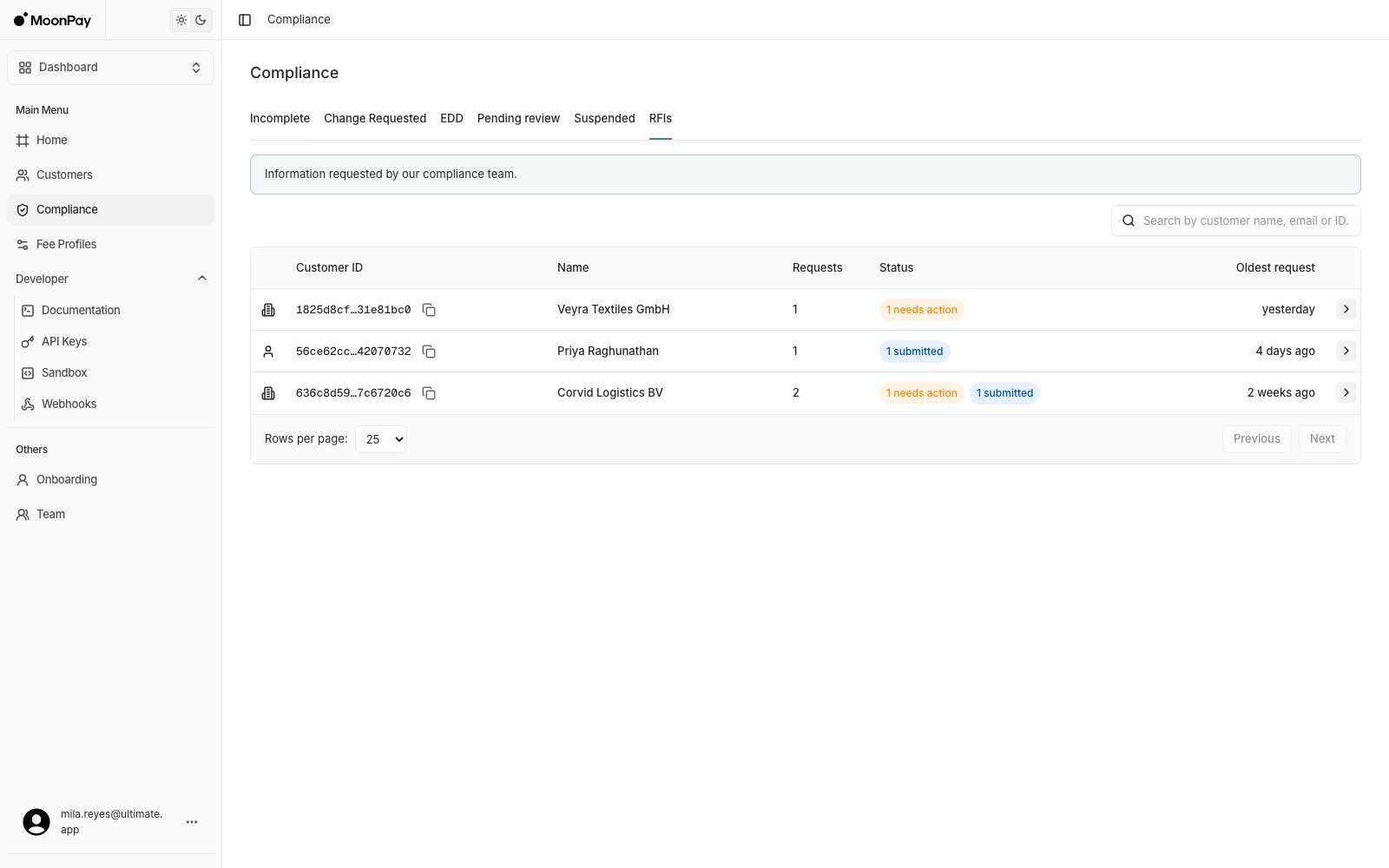
**Compliance** > **RFIs**: every customer with an open request, how many requests each one has, and the age of the oldest. The status column separates what you owe a response on from what is already back with MoonPay.
 ### 2. Read the request
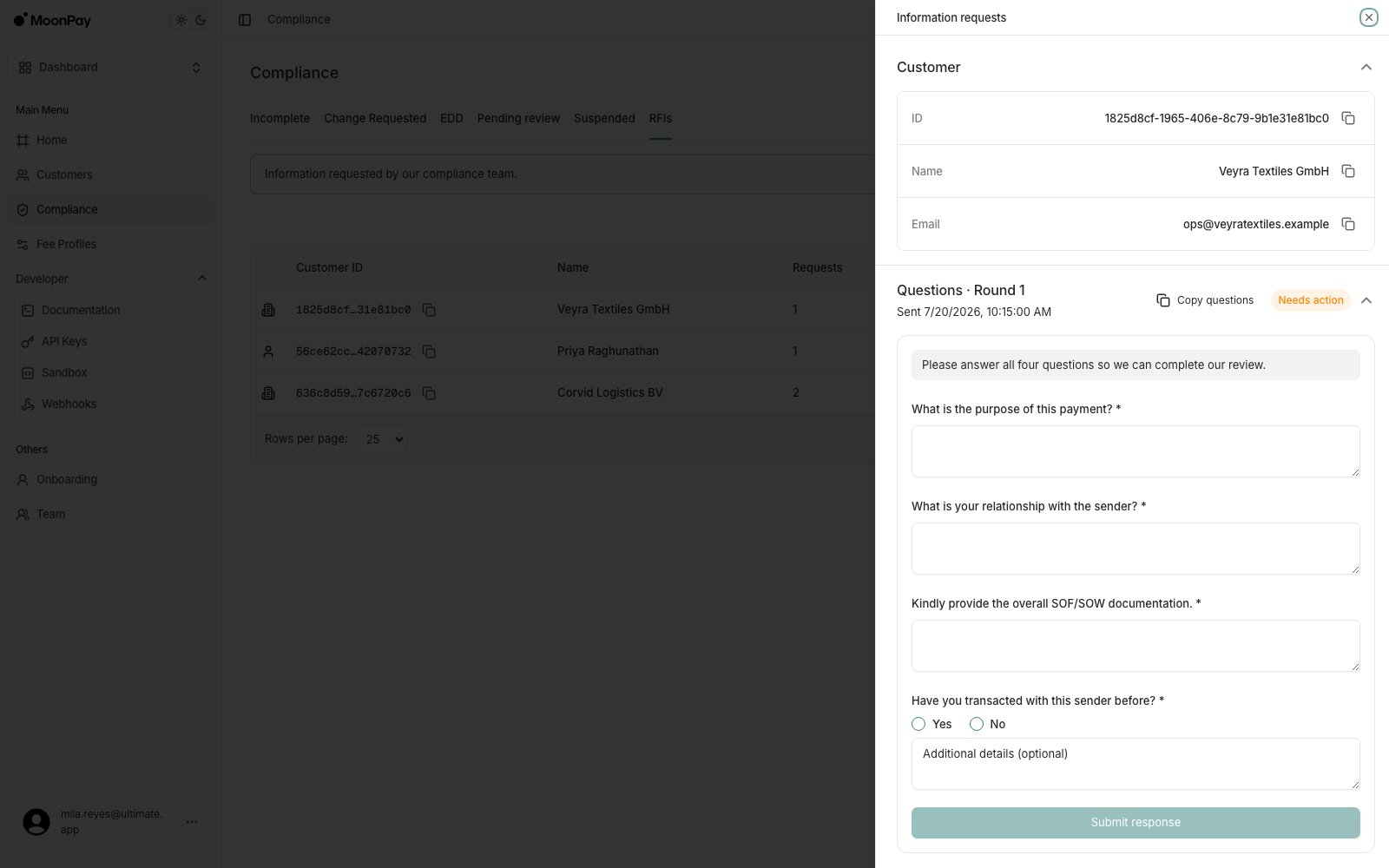
Click the customer's name. **Questions · Round 1** lists what was asked, with the analyst's instruction above the questions and a **Needs action** badge while a response is outstanding. **Copy questions** copies them to your clipboard to forward to your customer.
Required questions carry an asterisk, and each answer box matches the question type: free text, or Yes/No with an optional details field.
### 2. Read the request
Click the customer's name. **Questions · Round 1** lists what was asked, with the analyst's instruction above the questions and a **Needs action** badge while a response is outstanding. **Copy questions** copies them to your clipboard to forward to your customer.
Required questions carry an asterisk, and each answer box matches the question type: free text, or Yes/No with an optional details field.
 ### 3. Submit the response
**Submit response** stays disabled until every required question has an answer. When documents were requested, the card also shows a secure upload link, and submitting is blocked until that link has been opened.
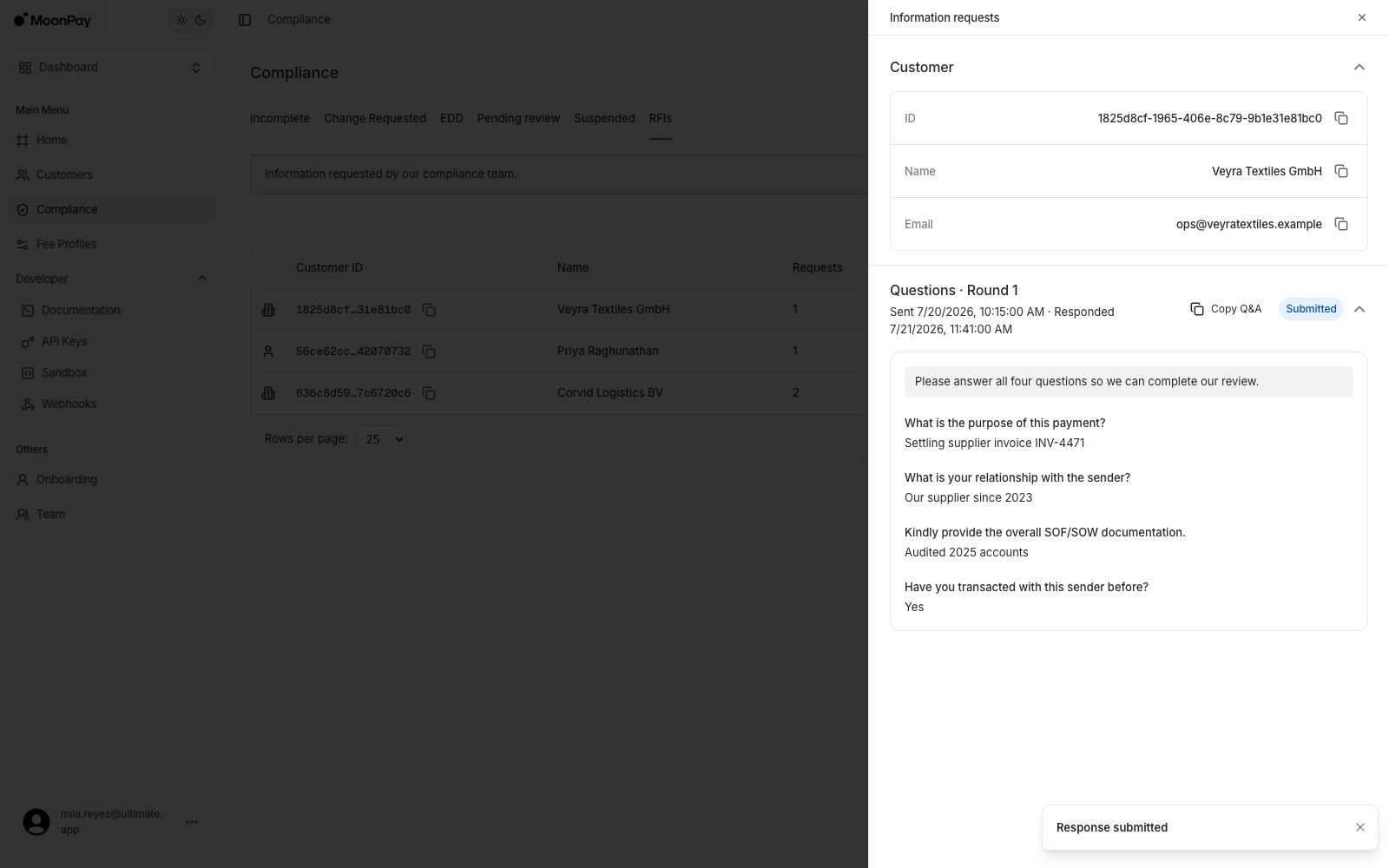
After submitting, the card turns read-only: a **Submitted** badge, your answers echoed under each question, a Responded timestamp, and **Copy Q\&A** for the whole exchange. The customer's row drops its needs-action badge.
### 3. Submit the response
**Submit response** stays disabled until every required question has an answer. When documents were requested, the card also shows a secure upload link, and submitting is blocked until that link has been opened.
After submitting, the card turns read-only: a **Submitted** badge, your answers echoed under each question, a Responded timestamp, and **Copy Q\&A** for the whole exchange. The customer's row drops its needs-action badge.
 A follow-up round arrives as a new **Questions · Round 2** card on the same RFI, and the customer's row goes back to needs action. Answer it the same way.
## List open RFIs
`GET /api/rfis`
Returns RFIs in `waiting_on_response` or `needs_review`, grouped by customer. Customers with at least one RFI still waiting on a response come first, then the customer whose oldest RFI was sent earliest. Closed RFIs are not included.
### Query parameters
| Parameter | Type | Required | Description |
| ------------- | ------------- | -------- | ---------------------------------------------------------------------------------- |
| `search_term` | string | No | Matches customer name, customer email, or an exact customer ID. Max 256 characters |
| `cursor` | string (UUID) | No | Customer ID from the previous response's `cursor`. Fetches the next page |
| `prev_cursor` | string (UUID) | No | Customer ID from the previous response's `prev_cursor`. Fetches the previous page |
| `page_size` | integer | No | Customers per page. Default `10`, max `100` |
```bash theme={null}
curl -X GET "https://api.sandbox.iron.xyz/api/rfis?page_size=25" \
-H "X-API-Key: "
```
```typescript theme={null}
const response = await fetch(
"https://api.sandbox.iron.xyz/api/rfis?page_size=25",
{ headers: { "X-API-Key": "" } },
);
```
```python theme={null}
response = requests.get(
"https://api.sandbox.iron.xyz/api/rfis",
params={"page_size": 25},
headers={"X-API-Key": ""},
)
```
### Response
```json theme={null}
{
"items": [
{
"customer_id": "9c1f0a3e-5d4b-4f20-9a6e-3b71c8f2d014",
"customer_name": "Alina Vogt",
"customer_email": "alina.vogt@example.com",
"customer_type": "Person",
"oldest_sent_at": "2026-09-12T09:14:02Z",
"rfis": [
{
"id": "7f3a2b18-64c9-4f8d-8c31-b0d5e9a12f77",
"customer_id": "9c1f0a3e-5d4b-4f20-9a6e-3b71c8f2d014",
"transaction_id": null,
"rfi_type": "probing_questions",
"status": "waiting_on_response",
"outcome": null,
"rounds": [
{
"id": "c58e1d47-2a90-4b6f-9f03-7e2c4a8b1d55",
"round_number": 1,
"questions": [
{
"id": "employment_status",
"prompt": "What is the customer's current employment status?",
"answer_type": "text",
"required": true
},
{
"id": "trades_for_third_party",
"prompt": "Is the customer transacting on behalf of anyone else?",
"answer_type": "yes_no",
"required": true
}
],
"answers": null,
"analyst_instructions": "Answers should come from the customer, not from your own records.",
"documents_requested": true,
"document_instructions": "Upload the last three months of bank statements.",
"document_upload_url": "https://uploads.example.com/r/c58e1d47",
"document_link_opened_at": null,
"sent_at": "2026-09-12T09:14:02Z",
"response_received_at": null
}
],
"sent_at": "2026-09-12T09:14:02Z",
"response_received_at": null,
"closed_at": null,
"created_at": "2026-09-12T09:14:02Z",
"updated_at": "2026-09-12T09:14:02Z"
}
]
}
],
"cursor": null
}
```
`cursor` is the customer ID to pass as `cursor` for the next page. It is `null` on the last page.
## List a customer's RFIs
`GET /api/customers/{customer_id}/rfis`
Returns the open RFIs for one customer as a flat array, newest first. Closed RFIs are not included here. Fetch a closed RFI by ID instead.
```bash theme={null}
curl -X GET "https://api.sandbox.iron.xyz/api/customers/9c1f0a3e-5d4b-4f20-9a6e-3b71c8f2d014/rfis" \
-H "X-API-Key: "
```
## Get an RFI
`GET /api/rfis/{rfi_id}`
Returns one RFI in any status, including closed.
```bash theme={null}
curl -X GET "https://api.sandbox.iron.xyz/api/rfis/7f3a2b18-64c9-4f8d-8c31-b0d5e9a12f77" \
-H "X-API-Key: "
```
### Response
The RFI ID.
The customer the RFI is about.
The transaction under review. Always set for `source_of_funds`, `null` otherwise.
`probing_questions` or `source_of_funds`.
`waiting_on_response`, `needs_review`, or `closed`.
`passed`, `failed`, or `closed`. Set once the RFI is closed, `null` before that.
One entry per round, sorted by `round_number` ascending.
The round ID. Pass it as `round_id` when you respond.
Starts at 1 and increments per follow-up.
Question ID. Use it as `question_id` in your answer. Unique within the round.
The question to put to your customer.
`text` or `yes_no`. Determines which answer field to send.
When `true`, the response is rejected unless this question is answered.
The transaction this question asks about. Present on `source_of_funds` questions, omitted otherwise.
The answers you submitted for this round. `null` until you respond.
Free-text guidance from the MoonPay reviewer. `null` when there is none.
When `true`, the round needs documents as well as answers.
What the documents need to show.
Secure upload link for the requested files. Set only when `documents_requested` is `true`.
When the upload link was first recorded as opened. `null` until then.
When the round was sent.
When your response for this round arrived. `null` until then.
When the first round was sent.
When the most recent response arrived. `null` if you have not responded yet.
When MoonPay closed the RFI. `null` while it is open.
## Record that the upload link was opened
`POST /api/rfis/{rfi_id}/rounds/{round_id}/document-link-opened`
Records that the round's `document_upload_url` was opened, and stamps `document_link_opened_at`. Call it once, when you hand the link to your customer.
When you authenticate with an API key, this call is optional: you can submit a response with `documents_uploaded: true` without it. A signed-in dashboard user has to open the link first, otherwise the response is rejected with `400`.
```bash theme={null}
curl -X POST "https://api.sandbox.iron.xyz/api/rfis/7f3a2b18-64c9-4f8d-8c31-b0d5e9a12f77/rounds/c58e1d47-2a90-4b6f-9f03-7e2c4a8b1d55/document-link-opened" \
-H "X-API-Key: " \
-H "Idempotency-Key: "
```
Returns `200` with an empty body.
This `POST` requires an `Idempotency-Key` header. See [Idempotency](/idempotency) for retry behavior.
Calling it twice for the same round returns `409`. See [Common errors](#common-errors).
## Submit a response
`POST /api/rfis/{rfi_id}/rounds/{round_id}/response`
Submits answers for one round. One call per round: there is no partial save, so send every answer you have at once.
### Body
| Field | Type | Required | Description |
| ------------------------- | ------- | ----------- | ----------------------------------------------------------------------- |
| `answers` | array | Yes | One entry per answered question. Send `[]` for a documents-only round |
| `answers[].question_id` | string | Yes | Must match a question `id` in this round. No duplicates |
| `answers[].text_value` | string | Conditional | Required for `text` questions, and must be non-empty. Omit for `yes_no` |
| `answers[].boolean_value` | boolean | Conditional | Required for `yes_no` questions. Omit for `text` |
| `answers[].explanation` | string | No | Free-text context for the answer. Allowed on either answer type |
| `documents_uploaded` | boolean | Yes | Must be `true` when the round has `documents_requested: true` |
Send exactly one value per answer. A `text` question with `boolean_value` set, or a `yes_no` question with `text_value` set, returns `400`. Every question marked `required: true` has to be answered in the same call.
```bash theme={null}
curl -X POST "https://api.sandbox.iron.xyz/api/rfis/7f3a2b18-64c9-4f8d-8c31-b0d5e9a12f77/rounds/c58e1d47-2a90-4b6f-9f03-7e2c4a8b1d55/response" \
-H "Content-Type: application/json" \
-H "X-API-Key: " \
-H "Idempotency-Key: " \
-d '{
"answers": [
{
"question_id": "employment_status",
"text_value": "Employed full time as a nurse",
"explanation": "Confirmed by the customer on a recorded call."
},
{
"question_id": "trades_for_third_party",
"boolean_value": false
}
],
"documents_uploaded": true
}'
```
Returns `200` with an empty body. The RFI moves to `needs_review` and `response_received_at` is set on both the round and the RFI.
This `POST` requires an `Idempotency-Key` header. See [Idempotency](/idempotency) for retry behavior.
### Error response
A rejected response returns `400` with a plain-text body, not JSON:
```bash theme={null}
< HTTP/2 400
< content-type: text/plain; charset=utf-8
<
RFI answers are malformed
```
Unlike most API errors, these `400` bodies are plain text. Don't parse them as JSON.
## Common errors
| Error | Cause |
| -------------------- | ----------------------------------------------------------------------------------------------------------------------------------------------------------------------------- |
| `400 Bad Request` | `RFI answers are malformed`: unknown or duplicated `question_id`, the wrong value field for the question's `answer_type`, an empty `text_value`, or a missing required answer |
| `400 Bad Request` | `requested documents must be acknowledged before submitting`: the round requested documents and `documents_uploaded` is not `true` |
| `401 Unauthorized` | Missing or invalid `X-API-Key` |
| `403 Forbidden` | The API key lacks `View` for the read endpoints, or `UpdateCustomer` for the write endpoints |
| `404 Not Found` | Unknown customer, RFI, or round, or it belongs to another partner |
| `409 Conflict` | The RFI is not in `waiting_on_response`, the round is not the latest one, or the upload link was already recorded as opened |
| `500 Internal Error` | The request failed server-side. Safe to retry |
`400` is the only status that carries a body. Unlike most of the API, these endpoints return no `message` or `trace_id` on `500`.
## Related guides
A follow-up round arrives as a new **Questions · Round 2** card on the same RFI, and the customer's row goes back to needs action. Answer it the same way.
## List open RFIs
`GET /api/rfis`
Returns RFIs in `waiting_on_response` or `needs_review`, grouped by customer. Customers with at least one RFI still waiting on a response come first, then the customer whose oldest RFI was sent earliest. Closed RFIs are not included.
### Query parameters
| Parameter | Type | Required | Description |
| ------------- | ------------- | -------- | ---------------------------------------------------------------------------------- |
| `search_term` | string | No | Matches customer name, customer email, or an exact customer ID. Max 256 characters |
| `cursor` | string (UUID) | No | Customer ID from the previous response's `cursor`. Fetches the next page |
| `prev_cursor` | string (UUID) | No | Customer ID from the previous response's `prev_cursor`. Fetches the previous page |
| `page_size` | integer | No | Customers per page. Default `10`, max `100` |
```bash theme={null}
curl -X GET "https://api.sandbox.iron.xyz/api/rfis?page_size=25" \
-H "X-API-Key: "
```
```typescript theme={null}
const response = await fetch(
"https://api.sandbox.iron.xyz/api/rfis?page_size=25",
{ headers: { "X-API-Key": "" } },
);
```
```python theme={null}
response = requests.get(
"https://api.sandbox.iron.xyz/api/rfis",
params={"page_size": 25},
headers={"X-API-Key": ""},
)
```
### Response
```json theme={null}
{
"items": [
{
"customer_id": "9c1f0a3e-5d4b-4f20-9a6e-3b71c8f2d014",
"customer_name": "Alina Vogt",
"customer_email": "alina.vogt@example.com",
"customer_type": "Person",
"oldest_sent_at": "2026-09-12T09:14:02Z",
"rfis": [
{
"id": "7f3a2b18-64c9-4f8d-8c31-b0d5e9a12f77",
"customer_id": "9c1f0a3e-5d4b-4f20-9a6e-3b71c8f2d014",
"transaction_id": null,
"rfi_type": "probing_questions",
"status": "waiting_on_response",
"outcome": null,
"rounds": [
{
"id": "c58e1d47-2a90-4b6f-9f03-7e2c4a8b1d55",
"round_number": 1,
"questions": [
{
"id": "employment_status",
"prompt": "What is the customer's current employment status?",
"answer_type": "text",
"required": true
},
{
"id": "trades_for_third_party",
"prompt": "Is the customer transacting on behalf of anyone else?",
"answer_type": "yes_no",
"required": true
}
],
"answers": null,
"analyst_instructions": "Answers should come from the customer, not from your own records.",
"documents_requested": true,
"document_instructions": "Upload the last three months of bank statements.",
"document_upload_url": "https://uploads.example.com/r/c58e1d47",
"document_link_opened_at": null,
"sent_at": "2026-09-12T09:14:02Z",
"response_received_at": null
}
],
"sent_at": "2026-09-12T09:14:02Z",
"response_received_at": null,
"closed_at": null,
"created_at": "2026-09-12T09:14:02Z",
"updated_at": "2026-09-12T09:14:02Z"
}
]
}
],
"cursor": null
}
```
`cursor` is the customer ID to pass as `cursor` for the next page. It is `null` on the last page.
## List a customer's RFIs
`GET /api/customers/{customer_id}/rfis`
Returns the open RFIs for one customer as a flat array, newest first. Closed RFIs are not included here. Fetch a closed RFI by ID instead.
```bash theme={null}
curl -X GET "https://api.sandbox.iron.xyz/api/customers/9c1f0a3e-5d4b-4f20-9a6e-3b71c8f2d014/rfis" \
-H "X-API-Key: "
```
## Get an RFI
`GET /api/rfis/{rfi_id}`
Returns one RFI in any status, including closed.
```bash theme={null}
curl -X GET "https://api.sandbox.iron.xyz/api/rfis/7f3a2b18-64c9-4f8d-8c31-b0d5e9a12f77" \
-H "X-API-Key: "
```
### Response
The RFI ID.
The customer the RFI is about.
The transaction under review. Always set for `source_of_funds`, `null` otherwise.
`probing_questions` or `source_of_funds`.
`waiting_on_response`, `needs_review`, or `closed`.
`passed`, `failed`, or `closed`. Set once the RFI is closed, `null` before that.
One entry per round, sorted by `round_number` ascending.
The round ID. Pass it as `round_id` when you respond.
Starts at 1 and increments per follow-up.
Question ID. Use it as `question_id` in your answer. Unique within the round.
The question to put to your customer.
`text` or `yes_no`. Determines which answer field to send.
When `true`, the response is rejected unless this question is answered.
The transaction this question asks about. Present on `source_of_funds` questions, omitted otherwise.
The answers you submitted for this round. `null` until you respond.
Free-text guidance from the MoonPay reviewer. `null` when there is none.
When `true`, the round needs documents as well as answers.
What the documents need to show.
Secure upload link for the requested files. Set only when `documents_requested` is `true`.
When the upload link was first recorded as opened. `null` until then.
When the round was sent.
When your response for this round arrived. `null` until then.
When the first round was sent.
When the most recent response arrived. `null` if you have not responded yet.
When MoonPay closed the RFI. `null` while it is open.
## Record that the upload link was opened
`POST /api/rfis/{rfi_id}/rounds/{round_id}/document-link-opened`
Records that the round's `document_upload_url` was opened, and stamps `document_link_opened_at`. Call it once, when you hand the link to your customer.
When you authenticate with an API key, this call is optional: you can submit a response with `documents_uploaded: true` without it. A signed-in dashboard user has to open the link first, otherwise the response is rejected with `400`.
```bash theme={null}
curl -X POST "https://api.sandbox.iron.xyz/api/rfis/7f3a2b18-64c9-4f8d-8c31-b0d5e9a12f77/rounds/c58e1d47-2a90-4b6f-9f03-7e2c4a8b1d55/document-link-opened" \
-H "X-API-Key: " \
-H "Idempotency-Key: "
```
Returns `200` with an empty body.
This `POST` requires an `Idempotency-Key` header. See [Idempotency](/idempotency) for retry behavior.
Calling it twice for the same round returns `409`. See [Common errors](#common-errors).
## Submit a response
`POST /api/rfis/{rfi_id}/rounds/{round_id}/response`
Submits answers for one round. One call per round: there is no partial save, so send every answer you have at once.
### Body
| Field | Type | Required | Description |
| ------------------------- | ------- | ----------- | ----------------------------------------------------------------------- |
| `answers` | array | Yes | One entry per answered question. Send `[]` for a documents-only round |
| `answers[].question_id` | string | Yes | Must match a question `id` in this round. No duplicates |
| `answers[].text_value` | string | Conditional | Required for `text` questions, and must be non-empty. Omit for `yes_no` |
| `answers[].boolean_value` | boolean | Conditional | Required for `yes_no` questions. Omit for `text` |
| `answers[].explanation` | string | No | Free-text context for the answer. Allowed on either answer type |
| `documents_uploaded` | boolean | Yes | Must be `true` when the round has `documents_requested: true` |
Send exactly one value per answer. A `text` question with `boolean_value` set, or a `yes_no` question with `text_value` set, returns `400`. Every question marked `required: true` has to be answered in the same call.
```bash theme={null}
curl -X POST "https://api.sandbox.iron.xyz/api/rfis/7f3a2b18-64c9-4f8d-8c31-b0d5e9a12f77/rounds/c58e1d47-2a90-4b6f-9f03-7e2c4a8b1d55/response" \
-H "Content-Type: application/json" \
-H "X-API-Key: " \
-H "Idempotency-Key: " \
-d '{
"answers": [
{
"question_id": "employment_status",
"text_value": "Employed full time as a nurse",
"explanation": "Confirmed by the customer on a recorded call."
},
{
"question_id": "trades_for_third_party",
"boolean_value": false
}
],
"documents_uploaded": true
}'
```
Returns `200` with an empty body. The RFI moves to `needs_review` and `response_received_at` is set on both the round and the RFI.
This `POST` requires an `Idempotency-Key` header. See [Idempotency](/idempotency) for retry behavior.
### Error response
A rejected response returns `400` with a plain-text body, not JSON:
```bash theme={null}
< HTTP/2 400
< content-type: text/plain; charset=utf-8
<
RFI answers are malformed
```
Unlike most API errors, these `400` bodies are plain text. Don't parse them as JSON.
## Common errors
| Error | Cause |
| -------------------- | ----------------------------------------------------------------------------------------------------------------------------------------------------------------------------- |
| `400 Bad Request` | `RFI answers are malformed`: unknown or duplicated `question_id`, the wrong value field for the question's `answer_type`, an empty `text_value`, or a missing required answer |
| `400 Bad Request` | `requested documents must be acknowledged before submitting`: the round requested documents and `documents_uploaded` is not `true` |
| `401 Unauthorized` | Missing or invalid `X-API-Key` |
| `403 Forbidden` | The API key lacks `View` for the read endpoints, or `UpdateCustomer` for the write endpoints |
| `404 Not Found` | Unknown customer, RFI, or round, or it belongs to another partner |
| `409 Conflict` | The RFI is not in `waiting_on_response`, the round is not the latest one, or the upload link was already recorded as opened |
| `500 Internal Error` | The request failed server-side. Safe to retry |
`400` is the only status that carries a body. Unlike most of the API, these endpoints return no `message` or `trace_id` on `500`.
## Related guides